

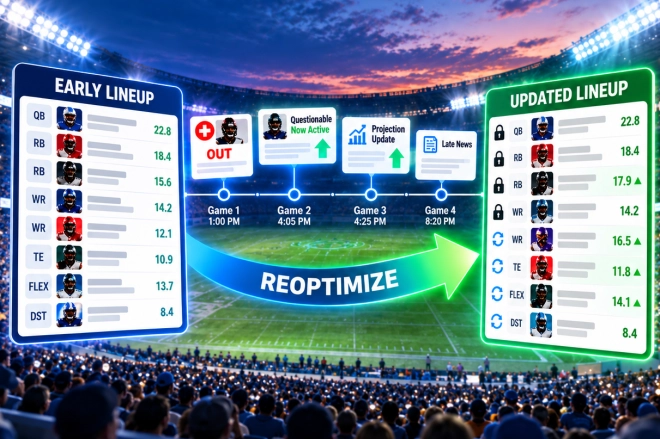
DFS lineups are rarely finished when the first game starts.
On a multi-game slate, several hours may separate the first kickoff, tipoff or first pitch from the last. During that time, a lot can change. A questionable player can suddenly be ruled out. Another can be confirmed active. A starter can change. And one piece of news can ripple through the projections of several other players.
That makes late swap one of the most important advantages available to DFS players.
A lineup that looked great when you built it may no longer be the best lineup you can field several hours later. Taking advantage of new information lets you keep competing all the way through the slate instead of simply crossing your fingers after the first game locks.
ASL's Reoptimize tools are designed to make those late-swap adjustments much easier.
Start With Your Existing Lineups
Reoptimization begins in ASL's Multi-Lineup Editor, but you do not necessarily have to create the original lineups with ASL.
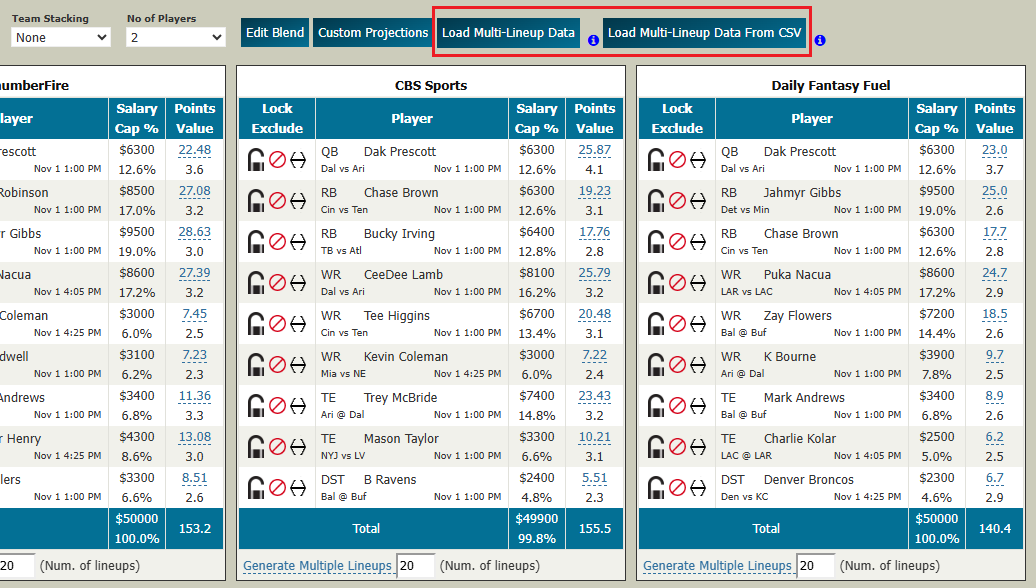
From the main DFS Optimizer page, you have two ways to bring a lineup set into the editor:
-
Load Multi-Lineup Data reloads lineups previously generated and saved by ASL.
-
Load Multi-Lineup Data From CSV lets you bring in lineups created elsewhere, including lineups built with another optimizer or directly through DraftKings or FanDuel.
There is an important difference between the two.
When ASL reloads its own saved lineup data, it has much more information about how those lineups were constructed, including the projection provider associated with each lineup and other information retained by the optimizer.
When you load a CSV created elsewhere, ASL can only know what is contained in that file. For example, the CSV does not tell ASL that you intentionally locked a particular player when you originally built the lineup.
Either way, once the lineups are loaded, the Multi-Lineup Editor becomes your late-swap workspace.
The Multi-Lineup Editor Gives You Control
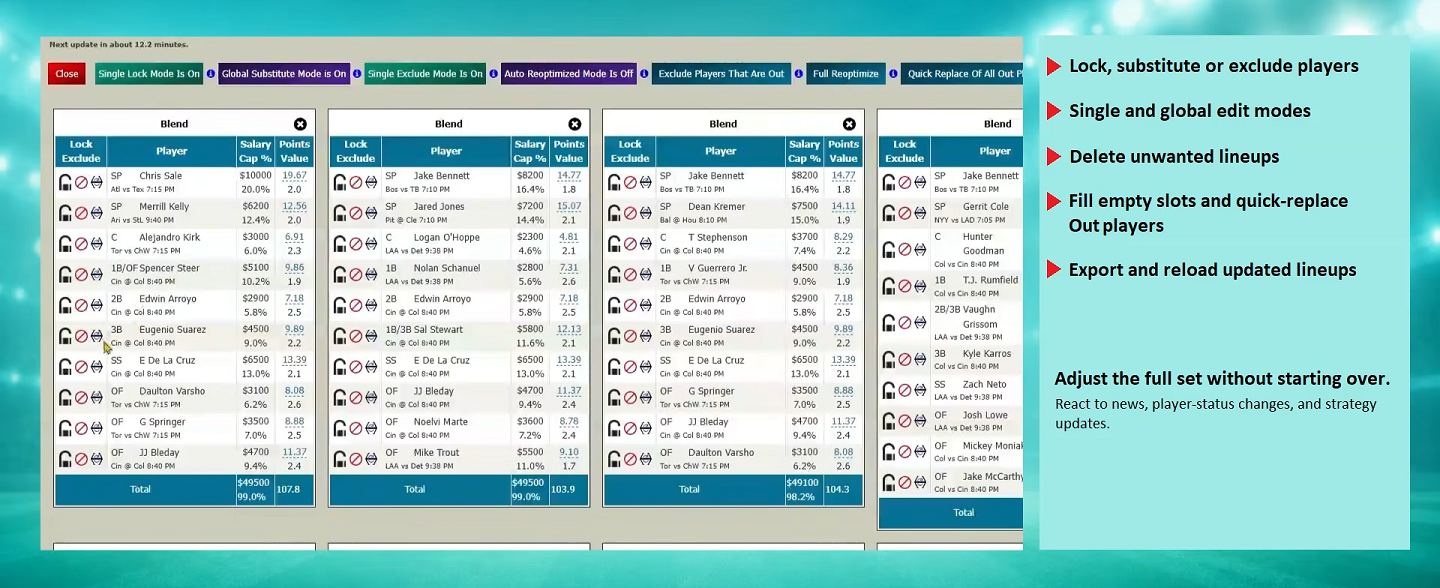
The editor lets you work with the lineup set without starting over.
You can lock, substitute or exclude players. Those changes can be made to an individual lineup or globally across the lineup set. You can delete unwanted lineups, remove players who are out, fill empty roster spots, and write the updated lineup set back to a CSV.
If you want to replace a specific player, the substitute tools show the available alternatives and the lineups in which the replacement can fit.
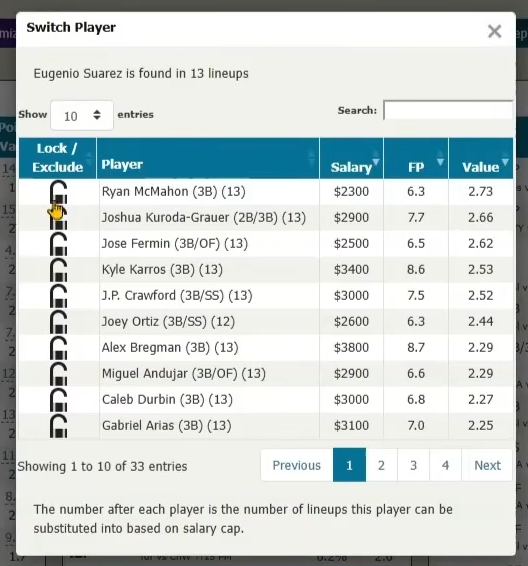
This is where ASL gives you precise control when a late-swap decision requires strategy rather than simply fixing an obvious problem.
But some late changes are obvious.
If a player is ruled out, you do not need a sophisticated portfolio analysis to know that a zero-point player should come out of the lineup.
That is where the faster reoptimization tools become especially useful.
Quickly Replace Players Who Are Out
As the slate progresses, players whose games have already started are retained while the remaining open roster positions can still be adjusted.
ASL provides several related tools in the Multi-Lineup Editor:
-
Exclude Players That Are Out removes newly unavailable players from consideration.
-
Fill Empty Slots optimizes replacements for roster positions you have opened.
-
Quick Replace Of All Out Players combines the obvious repair process so you can quickly remove out players and replace them.
-
Full Reoptimize goes farther and rebuilds the still-changeable portions of each lineup using current projections.
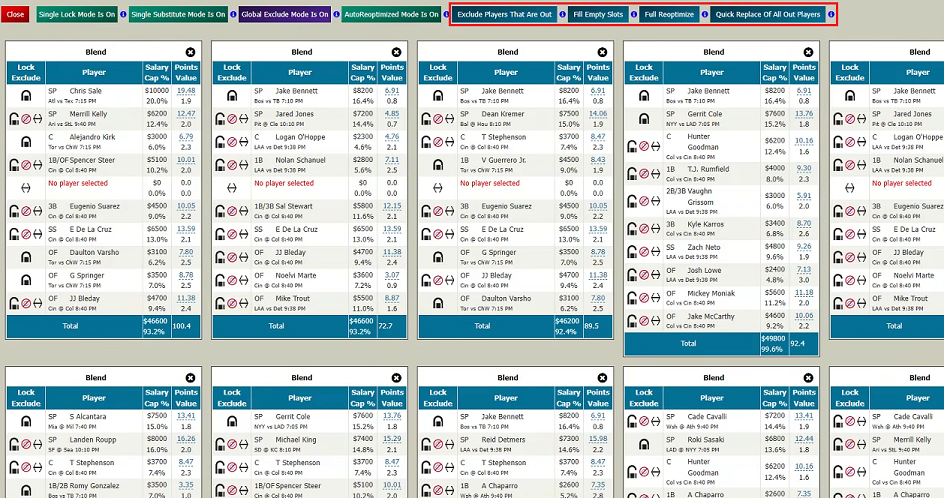
For an out player, making the replacement is usually the priority. Even if the substitute changes your original stack or creates a duplicate lineup, replacing a player projected for zero points is more important than perfectly preserving the original strategy.
Full Reoptimize requires a little more care.
Full Reoptimize Is Not Multi-Lineup Generation
This distinction is important.
When ASL originally generates a multi-lineup set, the optimizer works on the entire lineup set together. Pro Options can influence exposure, stacking, ownership and diversity across the portfolio.
Full Reoptimize does not repeat that process.
Instead, each lineup is reoptimized individually. Started players remain in place, and the optimizer attempts to improve the roster spots that are still available to change using the current projections.
That makes Full Reoptimize extremely convenient when you have a small number of lineups—for example, one lineup built from each projection provider.
But imagine that you created 100 lineups using exposure rules, different stacks and carefully controlled diversity. If many of those lineups have similar players locked into the early games, individually reoptimizing the remaining positions can cause them to converge on the same best projected replacements.
You could end up with duplicate or very similar lineups and lose much of the portfolio strategy you originally created.
For a large or strategically sensitive lineup set, Out-only replacement is generally the safer automatic adjustment. If you want to rethink stacks, exposure or other portfolio-wide decisions, use the Multi-Lineup Editor and make those strategic changes deliberately.
Let ASL Reoptimize Automatically
You do not have to sit in front of the optimizer waiting for every game window.
From the Multi-Lineup Editor, turn on AutoReoptimized Mode to open the Auto-Reoptimizer Setup.
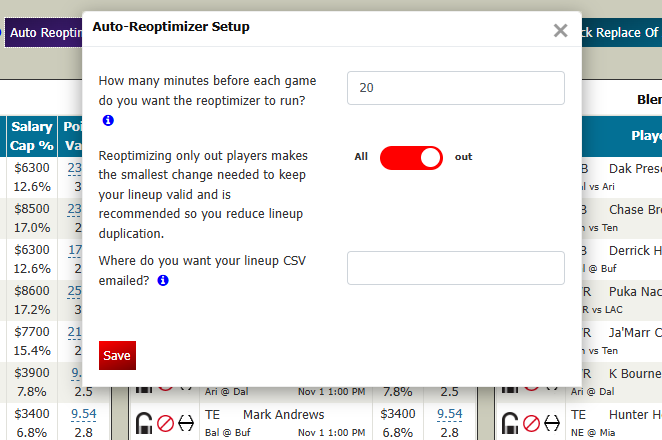
The setup has three basic choices.
When should ASL run?
Enter how many minutes before upcoming games you want the reoptimizer to run. A longer lead time gives you more time to receive, inspect and upload the new CSV. A shorter lead time can incorporate later information, but leaves you less time to act.
What should ASL replace?
Choose between All and out.
-
out focuses on players who have been ruled out and makes the smallest necessary changes.
-
All allows the still-changeable portions of each lineup to be fully reoptimized using the latest available projections.
For a larger lineup set, Out-only is usually the more conservative choice because it minimizes disruption to the strategy you originally built.
Where should ASL send the results?
Enter the email address where you want the updated lineup CSV delivered.
Once configured, ASL can revisit the saved lineup set as the slate progresses and email you an updated CSV.
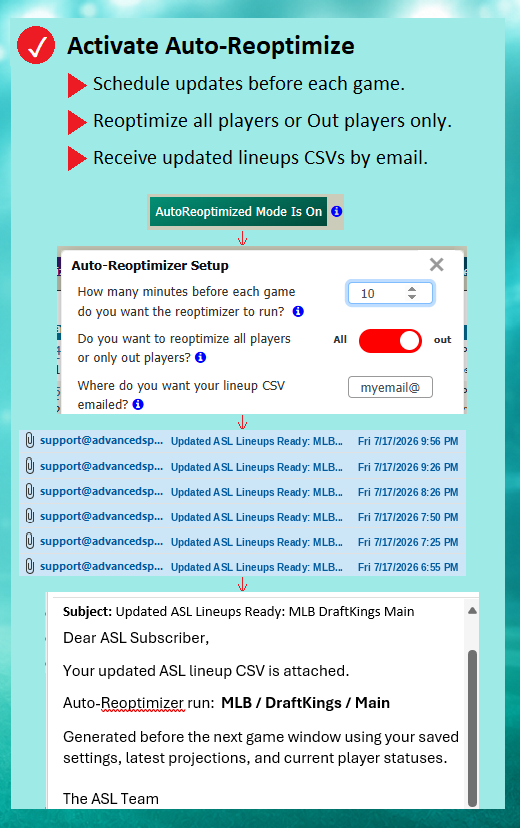
The file is sent to you—it is not automatically submitted to DraftKings, FanDuel or another DFS provider. You remain in control. Review the updated lineups, make any additional changes you want, and upload the CSV before the site's applicable late-swap deadline.
Make Sure ASL Has the Right Player IDs
To create an upload-ready CSV, ASL needs the player IDs used by the DFS provider for that particular slate.
ASL may already have those IDs. If not, the optimizer will ask you for the appropriate provider file—for example, the DraftKings salary file or the applicable FanDuel lineup CSV.
This is especially important when you load lineups from outside ASL. The lineup itself tells ASL which players are present, but the provider-specific IDs are what allow the resulting CSV to be uploaded correctly.
Save the Lineup Set You Actually Want Reoptimized
The automatic process works from your saved lineup data, so make sure the saved version represents the lineup set you actually want ASL to work with.
When lineups are originally generated, ASL saves the lineup set. If you later make changes in the Multi-Lineup Editor, Write Out Lineups creates the updated CSV and saves the current active lineup set.
That means you can generate your portfolio, refine it manually, save the version you actually intend to play, and then let Auto-Reoptimize work from that lineup set as the slate unfolds.
Automation for the Obvious — Control for the Important
Reoptimization is not intended to replace DFS strategy.
Its value is making the obvious work fast.
A player gets ruled out? Replace him.
Projections materially change before the late games? With a small lineup set, Full Reoptimize can quickly see whether stronger combinations are now available.
Managing a large tournament portfolio built around carefully chosen stacks, exposure and diversity? Use the automatic tools conservatively, then use the Multi-Lineup Editor when the change requires strategic judgment.
ASL gives you both.
You can make detailed manual changes when the decision deserves your attention, or let Reoptimize handle the routine late-swap work and email you an updated CSV.
The first game may have started—but your lineup decisions don't have to be finished.
