
There is a short stretch every year when all four major U.S. sports overlap. NFL and NHL are underway, MLB is winding down, and NBA preseason is beginning. The strategy for each sport can be very different because players interact differently within each game, but when it comes to building multiple DFS lineups, some important principles carry across all of them.
The goal is not simply to create more lineups. The goal is to create a strong set of meaningfully different lineups.
First, the Basics: How Do You Generate Multiple Lineups?
ASL's DFS Optimizer works somewhat differently from many other optimizers, so generating multiple lineups may initially feel a little non-intuitive. The first difference is projections.
ASL carries projections from multiple providers. When you click Generate Lineups, the optimizer normally gives you a lineup from each of three projection sources, along with a blend of the three. So instead of immediately seeing one "best" lineup, you may see four different optimized lineups based on different views of the same slate.
That leads to an important question before generating a larger lineup set: Which projection source do you want to use for generating your multiple lineups? You can generate them using your blend, one individual projection provider, or—as we will discuss later—use Cyclone Mode to build the set across several projection sources.
Generate Single Lineups First
Before ASL can generate multiple lineups, you first click Generate Lineups. That does much more under the hood than simply returning the few lineups you see on the screen.
The optimizer searches through a very large number of possible combinations and retains a pool of strong candidate lineups. Depending on the slate and your settings, there may be hundreds, thousands or even tens of thousands of potential seed lineups available to the multi-lineup generator. Those seed lineups give the next stage something much better to work with than repeatedly starting from scratch.
This leads to one of the biggest differences between ASL's optimizer and a traditional sequential lineup generator. ASL does not simply build lineup #1, then lineup #2, then lineup #3. It works on the entire lineup set together, repeatedly refining the set according to your exposure, stacking, ownership and diversity settings.
Before You Generate the Set
If you intend to upload a large lineup set directly into DraftKings or FanDuel, the optimizer needs the DFS site's player IDs for that specific slate. Since player IDs are specific for each slate, always be sure the files you upload and download match your intended slate; a player list from another slate will not match correctly.
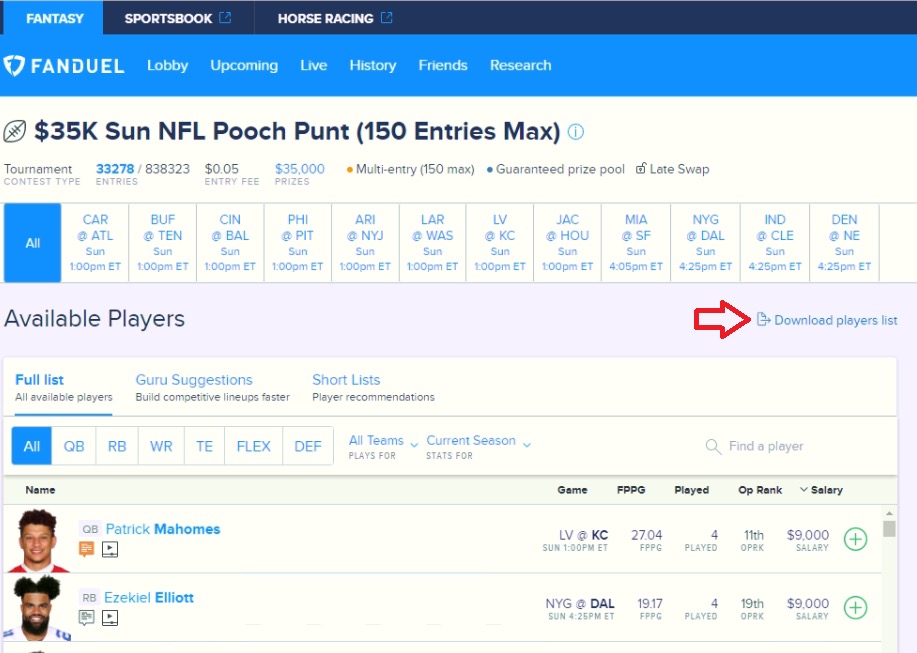
At the time of writing, ASL already has the necessary DraftKings player IDs. For FanDuel, go to the contest for your selected slate and download the player list. The following example uses an NFL FanDuel slate:
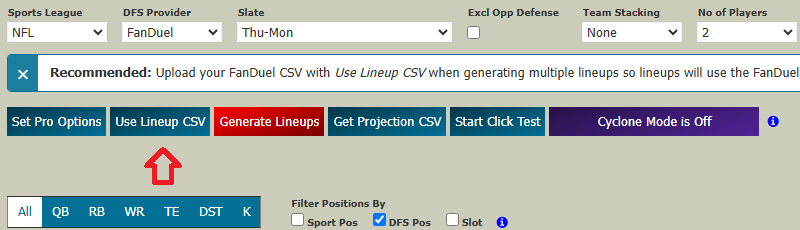
In the Lineup Optimizer, click Use Lineup CSV for Fanduel:
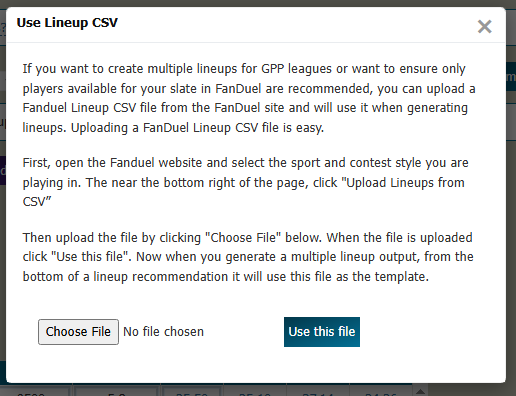
Load the CSV into the optimizer by choosing the file and clicking “Use this file”:
If you plan to use team stacking or any Pro Options, set them before generating the first lineup. When you generate the first lineup, it seeds the multi-lineup generator.
Then click “Generate Lineups”. You will get your single best lineup for each projection provider and for the blend:
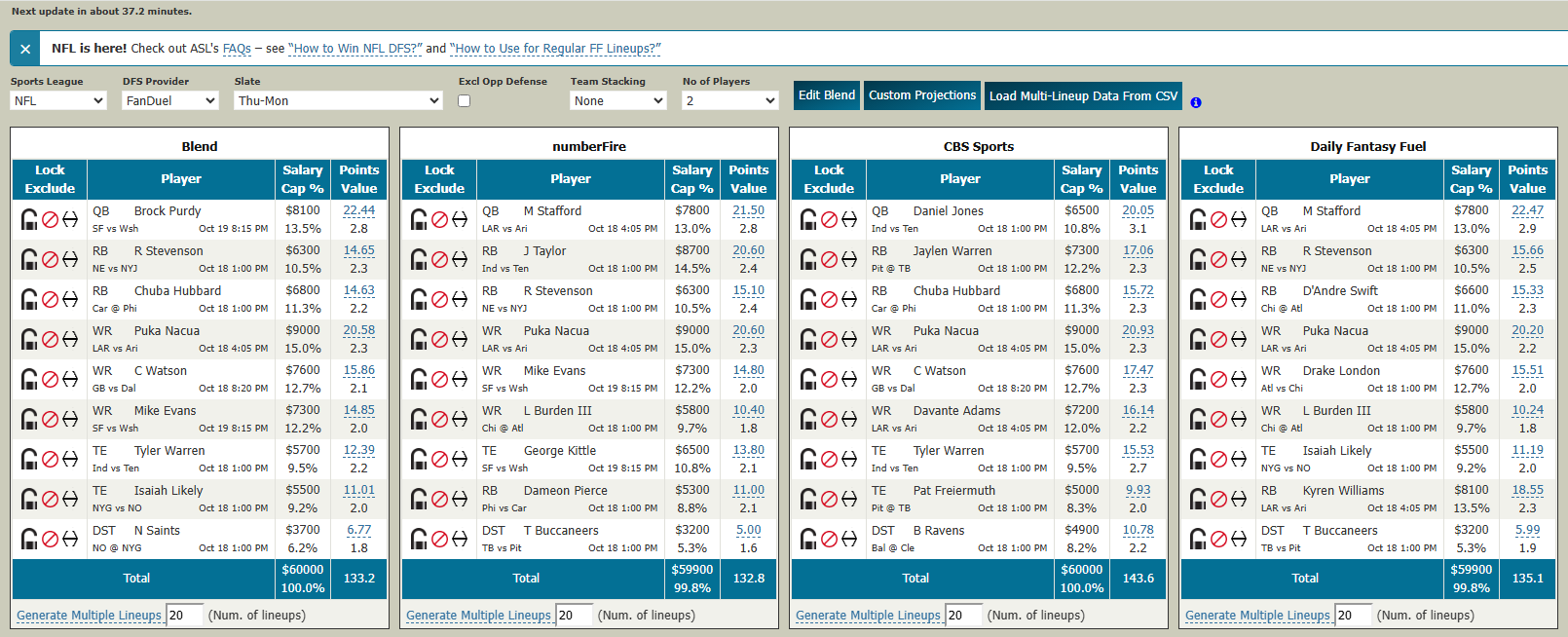
Under the lineup for the projection provider of your choice, indicate how many lineups you want (up to 150) and click Generate Multiple Lineups.
Once the multi-lineup generator finishes, a CSV file will be downloaded into your downloads folder:
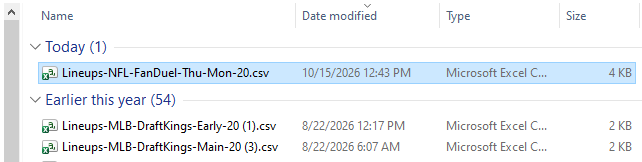
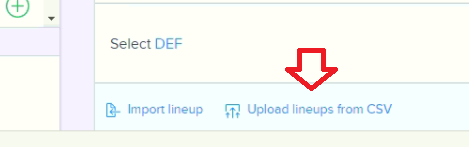
From your contest click “Upload lineups from CSV”:
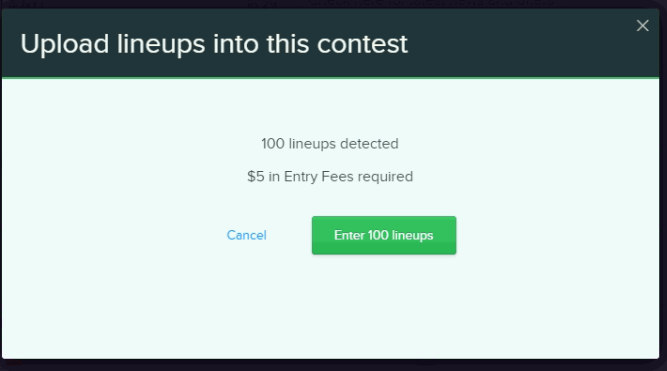
Select the CSV file, and click Upload:
Set Your Strategy Before Generating
Before generating the full lineup set, open Pro Options and set the rules that reflect your strategy. These can include maximum and minimum player exposure, ownership preferences, lineup diversity, team stacking, position-to-position correlation, minimum differences between lineups and individual player exposure limits.
You do not need to use every control. In fact, one of the themes of this article is that too many constraints can be worse than too few.
More Lineups Does Not Automatically Mean Better Lineups
Large DFS contests may allow dozens or even 150 entries, but that does not mean you should automatically build 150 lineups simply because you are allowed to. The real question is what kind of portfolio you are trying to create.
There are two different objectives. One is standalone hit rate—giving each individual lineup the strongest chance of succeeding on its own. The other is portfolio coverage—building lineups around different high-upside possibilities in the hope that one of them produces an exceptional result.
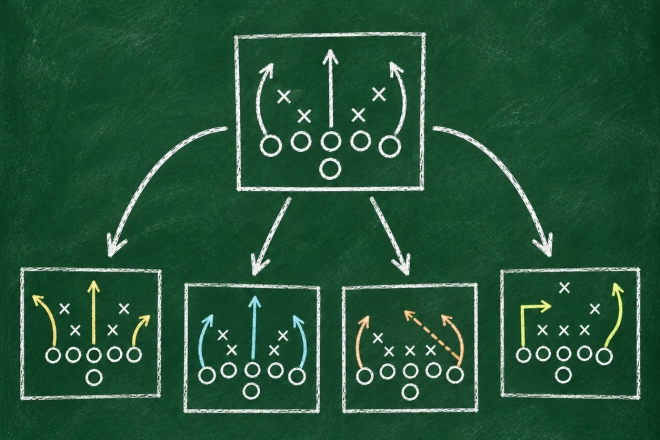
Those goals are not identical. To increase portfolio coverage, you deliberately reduce correlation among your lineups. Some may even be negatively correlated: one lineup could benefit from a particular game turning into a shootout, while another is built around the opposite game script.
Both lineups can be strong expressions of their underlying assumptions. But those competing scenarios cannot both occur. There's no guarantee either lineup will do well, but two lineups built around competing game scripts make it almost certain that at least one lineup will do poorly.
That is the fundamental tradeoff in multi-lineup play: more coverage across the lineup set versus concentrating on the scenario you believe has the strongest standalone chance of succeeding.
Favor Natural Diversity
I use the term natural diversity in a very specific way. The diversity measure I use is the ratio of the number of different players used across the lineup set to the number of lineups generated.
For example, one lineup containing ten players has a diversity ratio of 10. If 150 lineups are built from only 25 different players, the ratio falls to about 0.17. Somewhere between those two extremes, without applying any settings that force additional diversity, the ratio will pass through 1.0 — for example, 25 lineups built from 25 different players.
That is what I call the natural diversity point.
Rather than deciding in advance that you want 50, 100 or 150 lineups, try generating different lineup counts with no forced-diversity settings and watch the multi-lineup generator log to see how many unique players the optimizer naturally uses. The point where the number of unique players is roughly equal to the number of lineups gives you a useful indication of how many meaningfully different lineups the slate is producing on its own.
This does not mean a ratio of 1 is mathematically perfect or that you should never build more lineups. It is a practical way to let the slate tell you how much natural diversity exists before you begin forcing additional variation through exposure limits or diversity rules.
Cyclone Mode: Diversity From Different Opinions
That philosophy is the reason we developed Cyclone Mode. Instead of building your entire lineup set from one projection source, Cyclone rotates among the projection providers you select.
Each provider sees the slate somewhat differently. A player one source loves may be less attractive to another, a different value play may emerge, or a different stack may become optimal. Cyclone lets those differing views create lineup diversity naturally.
To use it, first generate your single lineups, then enable Cyclone Mode. When you enable it, a setup screen lets you select the projection sources and customize maximum and minimum exposure for defensive positions such as pitchers, goalies and NFL DST.
Cyclone creates its own multi-lineup generator below the regular lineups. Use that special generator rather than the standard Generate Multiple Lineups links so Cyclone is actually applied to the set.
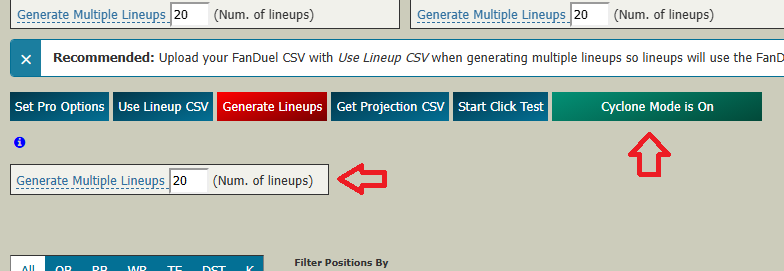
The optimizer then distributes the lineup set across the selected projection sources while continuing to optimize the entire set together. After you close the multi-lineup generator log, the Multi-Lineup Editor opens, and you will see the projection provider used for each of the lineups:

That gives you diversity based on genuine differences in information and projections rather than simply forcing randomness into the lineups.
A Brief Note About Stack Attack Mode
ASL also includes Stack Attack Mode, which builds on Cyclone Mode by spreading team stacks across selected teams as well as projection providers. It can be useful when you deliberately want broad team-stack coverage, particularly in sports such as MLB.
However, that is a separate strategy topic. For this article, the more important point is that you do not have to force stacks evenly across every team. A modest stacking bonus can allow correlated team combinations to emerge naturally where the projections support them. I will cover Stack Attack and the tradeoff between natural stacking and broader stack coverage in a separate article.
Watch the Run Log
One of the most useful tools in ASL's multi-lineup generator is the run log. As the optimizer refines the lineup set, the log shows both the base projected fantasy-point total of the lineups and a second value that includes the bonus fantasy points created by your stacking, diversity and ownership settings.
Those bonus points are not real projected fantasy points. They are incentives that tell the optimizer what kinds of lineup characteristics you value. Ideally, the optimizer finds ways to gain a large amount of bonus value while sacrificing little or no base projected fantasy-point value.
For example, suppose two lineups each project for 100 fantasy points. If the optimizer can swap one player for another with the same salary and the same projection, but that swap improves the stacking structure of both lineups, the base projected fantasy-point total stays the same while the bonus value increases. That is exactly what you want: better strategic structure without giving up projected scoring.
Some sacrifice in base projected fantasy points can be reasonable, but the tradeoff matters. Losing 10% of base projected fantasy points to gain 50% in bonus value may be worthwhile. Losing 90% of actual fantasy points just to double the bonus value means the settings have overwhelmed the substance of the lineups.
So watch the relationship between the two columns as the generator runs. The goal is to capture as much stacking, ownership and diversity bonus as possible without giving up too much base projected fantasy-point value. If the bonus total keeps improving while the base projected fantasy-point total collapses, the lineup set is over-constrained and the settings should be loosened.
Let the Slate Tell You How Many Lineups to Build
Years ago, I experimented extensively with increasing lineup counts and measuring how much additional player diversity appeared as the set grew. One lesson still makes sense today: there is usually a point of diminishing returns.
The early additional lineups may capture meaningful alternatives. As the lineup set grows, each new lineup may contribute progressively less natural diversity. Beyond the natural diversity point, you may simply be adding more lineups without adding a comparable number of new players or genuinely different possibilities.
That is why I would not start by asking, How many lineups will this contest let me enter? A better question is, How many strong, meaningfully different lineups can I generate for this slate? Those are not necessarily the same number.
Snipe the Shotgun
Large-field DFS contests often allow players to enter dozens or even 150 different lineups. Those players are effectively firing a shotgun — spreading their entries across many different possible outcomes in the hope that one pellet lands near the top and produces a payout large enough to cover all the others that miss.
ASL's Snipe the Shotgun strategy tries to take advantage of that.
The shotgun player deliberately builds a diversified portfolio. Different lineups represent different players, correlations and possible game outcomes, and some may even depend on competing scenarios. That makes sense for the portfolio because it increases the number of possibilities being covered.
When thousands of players use the same approach, the contest becomes filled with an enormous pool of diversified entries. The mathematical consequence is that most of those individual pellets must miss.
That is where the sniper gets his leverage.
Rather than adding another large portfolio of competing possibilities, the sniper concentrates on the single lineup he believes has the strongest standalone chance of succeeding — or perhaps one strongest lineup from each projection provider — and enters those carefully constructed lineups into the same field.
The sniper is therefore not merely choosing a different risk profile. He is trying to exploit the enormous diversity of mostly losing entries created by the shotgun players. Their strategy floods the field with pellets that, by design, mostly miss. If the sniper's carefully constructed lineup hits, it can climb through a field containing enormous numbers of entries that were created primarily to give their portfolios broader coverage rather than to maximize the standalone hit rate of every individual lineup.
That is the idea behind the name:
Snipe the Shotgun.
You let the field fire the shotgun. Then you try to put one carefully aimed shot through the resulting field of pellets.
Over many contests, the objective is not to maximize your chance of winning first place in any single contest. It is to give each lineup you enter a higher standalone hit rate than the average individual lineup created by the mass-entry portfolios surrounding it, with the goal of growing your bankroll more conservatively and consistently over time.
Use Multi-Lineup Mode Even for One Lineup
Even if you follow a Snipe the Shotgun approach and enter only one lineup, you may still want to use the multi-lineup generator because most of ASL's Pro Options take effect only during multi-lineup generation. Set the lineup count to 1, and you can take advantage of those controls while asking the optimizer for only one carefully constructed lineup.
Review the Lineups Before You Enter Them
Once generation is complete, the Multi-Lineup Editor gives you a final opportunity to inspect the set. You can lock, substitute or exclude players in one lineup or across the entire set, remove unwanted lineups, replace players who are out, fill open roster spots and write the revised lineup set back to CSV.
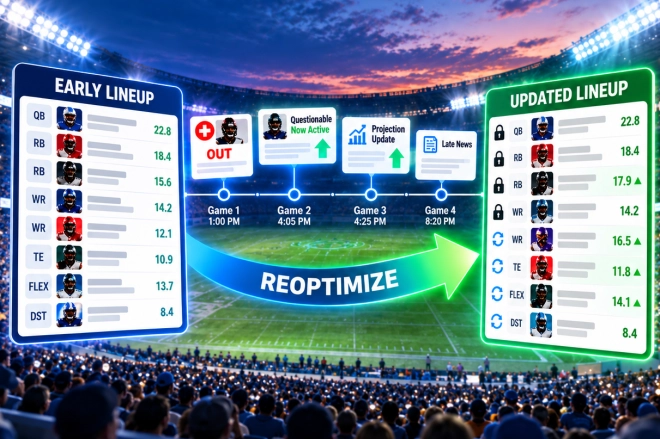
This becomes especially important as games approach because projections depend on the information available at the time. Players get scratched, starting lineups change, injury information arrives and baseball lineups become confirmed. Always review your lineups before lock, and use ASL's manual or automated reoptimization tools when appropriate to keep the set current as the slate progresses.
The Goal Is a Better Lineup Set
The most important thing to remember about multiple-lineup play is that more is not automatically better. Start from strong optimized lineups, use different projection sources when they provide legitimate alternative views of the slate, favor natural diversity before forcing it, and use stacking and correlation where players can rise and fall together.
Watch the run log to make sure your constraints are not overwhelming projected value, and let the slate tell you how many worthwhile lineups exist instead of automatically filling the maximum number of contest entries. Generating multiple lineups is easy. Building a strong lineup set is the real strategy.
DFS should be treated as entertainment. No strategy can guarantee a win or positive return, so set a budget, never risk more than you can afford to lose, and keep it fun.
